
ray-vox
2026
TL;DR
ray-vox is a voxel engine I built from scratch in Rust and WebGPU. Everything is ray traced, with no rasterization anywhere in it. Three pieces are finished and working: the data structure that holds the world, the importer that fills it, and a WGSL shader that traces the whole thing and paints it to the screen. Here it is rendering a real model, at a few hundred FPS.
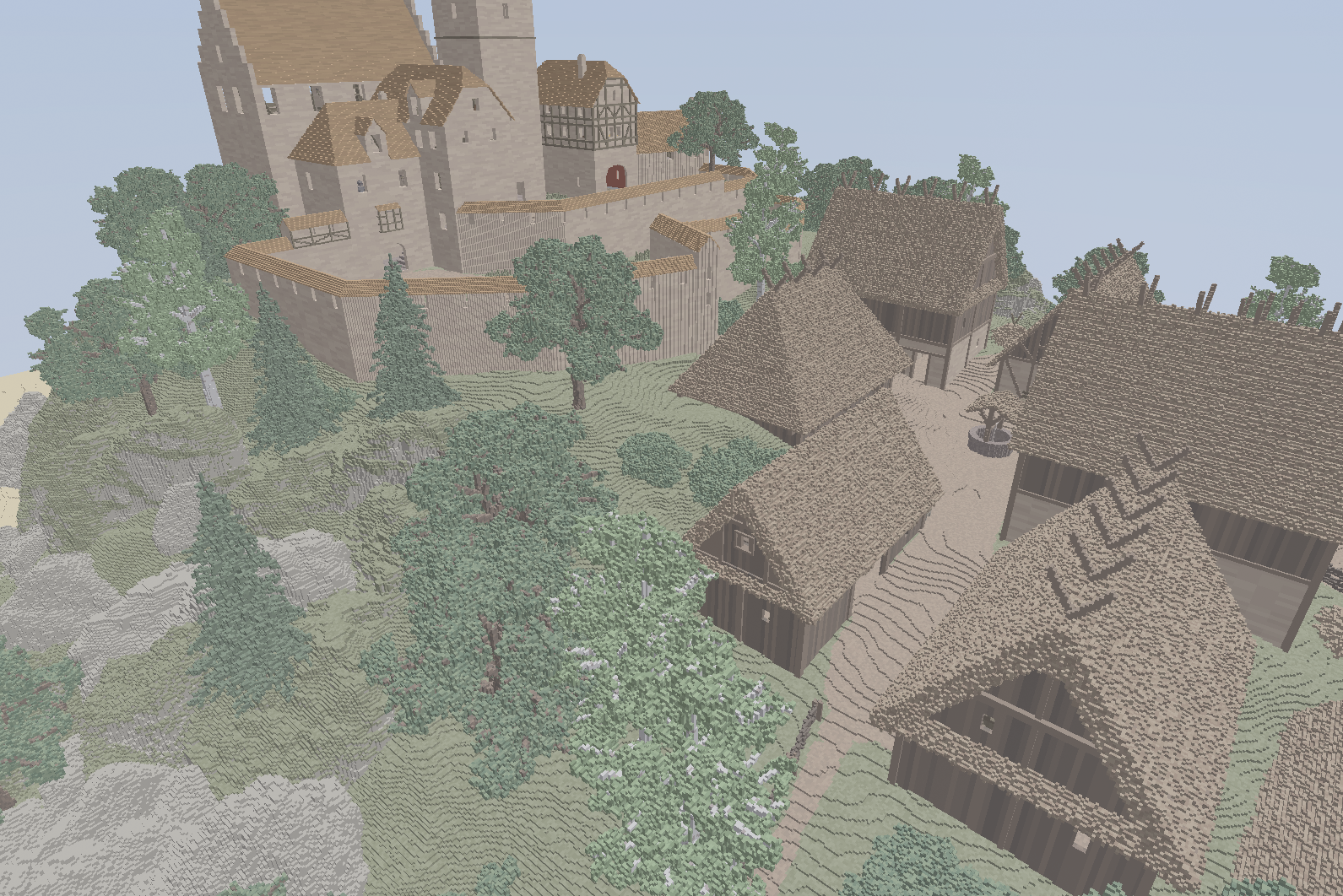
That’s 22 million voxels in a single fragment shader, with no rasterization and no hardware ray tracing. Each pixel fires one ray, the ray walks the tree and skips over big empty regions in a single step, and the pixel takes the color of the first voxel it hits. No lighting yet, so those are the raw voxel colors.
I stopped here deliberately. What I set out to get right was a structure that’s small and fast to trace at the same time, and the numbers say it works. There’s a long list of things I’d still like to add, real lighting and bigger worlds and more import formats, and I’ll get to some of them when I have time.
Smaller than the file it came from
The result I’m happiest with: I took the castle model from Teardown, an 84 MB MagicaVoxel file with 22 million voxels in it, and loaded it into my format. It came out to 15.3 MB.
| Format | Size | Can the GPU render it directly? |
|---|---|---|
MagicaVoxel .vox (the source) | 84.1 MB | no |
.vox + gzip -9 | 34.4 MB | no |
ray-vox .rvox (this project) | 15.3 MB | yes |
.rvox + gzip -9 | 6.6 MB | no |
About 5.5x smaller than the raw file, and smaller than a gzipped copy of that file, which is the part I didn’t expect. But the size is the less interesting half. Every other row in that table is a dead blob. A gzip is bytes you have to unpack before anything can look at them, and the raw .vox is an authoring format you’d have to parse and build a spatial index from before a shader could touch it. My 15.3 MB is the live thing the GPU reads. Uploading it is close to a straight copy into a couple of buffers, and the shader then walks that same bitpacked tree directly, one popcount at a time. The 15.3 MB on disk is the 15.3 MB the GPU traces.
It also has no color limit. MagicaVoxel caps the whole scene at 256 colors, full stop. In ray-vox each chunk carries its own little palette and pays only for the colors it actually uses, so a plain chunk collapses to almost nothing and the world as a whole can hold as many distinct voxels as it likes. That’s why it beats .vox even though .vox is already using palette indexing.
Why I needed a custom structure
A voxel engine wants three things that usually pull against each other. It should be small in memory, fast for rays to traverse, and quick to edit when the world changes. Most off-the-shelf approaches give you one or two and give up the third. Compress hard and traversal slows down. Make traversal fast and the memory balloons. I wanted all three, so I designed around getting them together instead of trading between them.
A few dead ends first
Landing on something that does all three took a couple of wrong turns.
My first idea was one giant sparse tree covering the whole world. That died fast: editing anything would mean rebuilding the entire tree and shipping the whole thing back to the GPU, which is hopeless for a world you actually want to change. So I broke the world into chunks instead, where an edit only touches and re-uploads the one chunk it lands in.
I picked chunks 256 voxels on a side mostly because the number felt right, and only later realized it had handed me something I like a lot. At that size, the two offsets a node keeps to find its children pack into a single 32-bit word with nothing to spare, 13 bits for one and 19 for the other, and a compile-time check fails loudly if I ever break that bound. It felt like the structure wanted to be built this way, though I’ll admit I got lucky.
The clipmap, which is how the world would hold several levels of detail at once, took a couple of tries too. I first tried making it yet another tree with chunks hanging off it as leaves at any level, but that wrecks ray tracing, because the stack a ray carries to remember its ancestors would have to be enormous. So I went back to a plain clipmap and borrowed the sparse trick from the chunk trees: a flat grid with one big bitmask marking what’s occupied, which a ray can march through quickly.
How it gets so small
A few ideas stack up. The structure is sparse, so empty space costs nothing at all, which matters because most of a voxel world is air. Identical regions are stored once and shared everywhere they show up, so a chunk of wall that repeats across the castle is kept as a single copy. Every number is packed down to the exact bits it needs, and each chunk carries its own small palette of materials, so the busy inner loop only ever touches tiny indices instead of full colors.
The part I’m proudest of is that there are no per-cell pointers anywhere. Normally a tree stores a pointer at every branch saying where its children live, and those pointers eat an enormous amount of space. Instead I keep a couple of bit masks per node and work out where a child lives by counting the set bits before it. The position falls out of arithmetic, so the pointers disappear. That alone is a big chunk of why the castle fits in 15.3 MB.
The extreme case is a solid shape. A filled sphere of 8.8 million voxels fits in 197 KB, roughly 175x smaller than storing one number per voxel, because a uniform region collapses to a single filled cell on a parent node instead of an actual subtree. It never spends a byte describing the inside of something that’s all one material.
Why this isn’t just compression
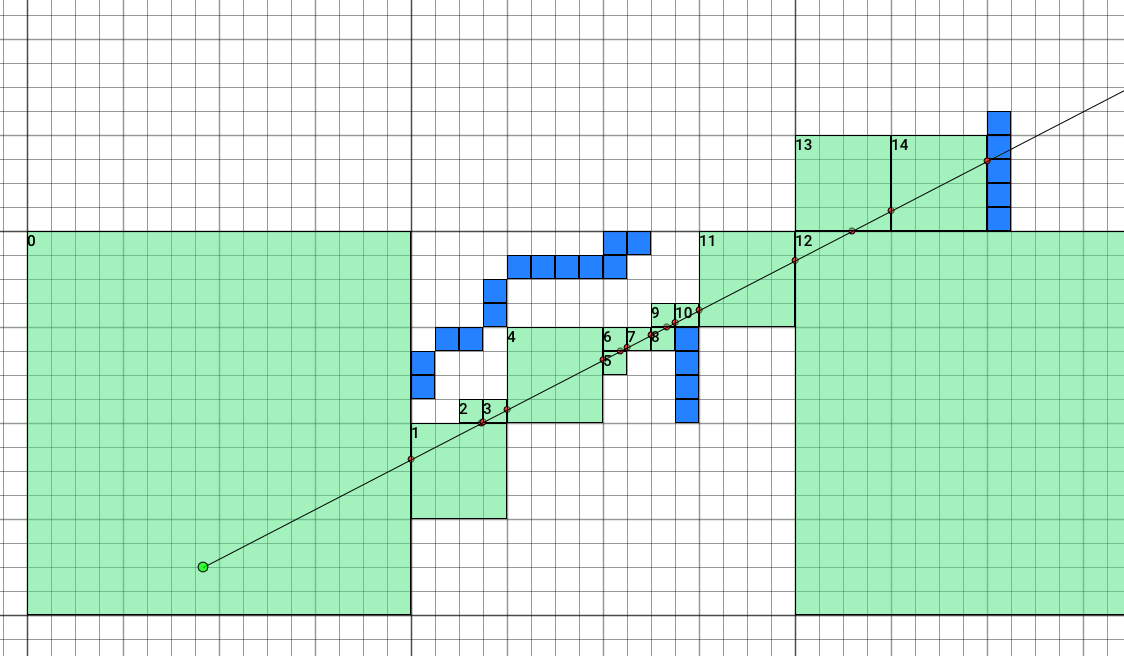
The same structure that makes the castle small is the thing a ray walks through to find what it hits. In the diagram above, a ray crosses a 2D version of the tree. The green cells are big empty regions it clears in a single step at their own scale, and the blue cells are where it drops down to look closer. The numbers are loop iterations, not voxels crossed, and one iteration can cross a whole empty subtree at once. The 3D shader runs the same idea.
Editing works the same way. An edit knows its own size in the world, so dropping a sphere the size of a planet far away barely costs anything, because it only gets evaluated against the coarse chunks it actually touches. A compressor can make bytes smaller, but you can’t trace a ray through a zip file.
Where the rays spend their time
Now that it renders, I can watch the structure work. Here’s the same scene, but each pixel is colored by how many times its ray had to read memory to resolve. Dark is cheap, bright is expensive.
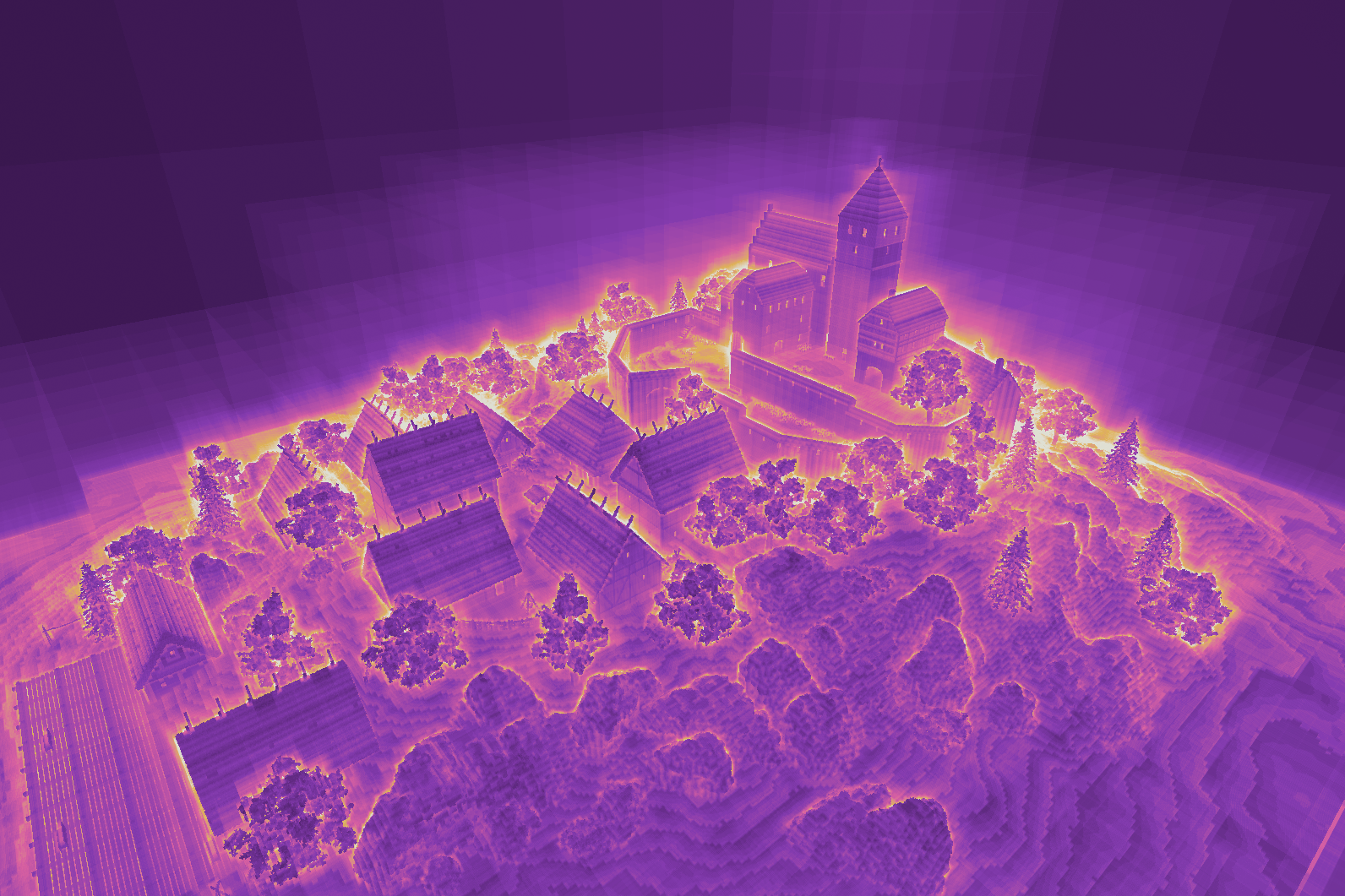
The pattern is roughly what I hoped for. The dark areas are rays that either miss everything or hit a big uniform chunk that resolves in one to three reads. The bright orange edges are grazing rays, the ones sliding along a silhouette, which have to descend deep into the tree and step across a lot of cell boundaries before they hit or slip past. Foliage lights up for the same reason: a tree is a mess of tiny scattered voxels, so a ray picks its way through with lots of little steps. Everywhere the frame stays cool, the tree is doing its job.
I didn’t tune for any of this. It’s just what the structure does, which was reassuring to see.
Build times
Baking an edit into a chunk runs at a couple billion voxels a second. Dropping a solid sphere of 8.8 million voxels into an empty chunk takes about 3 ms, because a big uniform fill collapses without visiting every voxel it covers. Importing the whole castle, scene graph and rotations and all, takes about 0.7 seconds. Once it’s saved as .rvox, loading it back from disk takes 2.3 ms. You’d hit disk bandwidth long before the loader broke a sweat.
Built for the GPU
I designed the whole thing to live on a GPU rather than just work on one in principle. The way the data sits on disk matches the way it sits in GPU memory, so uploading it is close to a straight copy with no conversion step. The code that reads a node avoids branches wherever it can, which keeps it fast when a whole group of GPU threads is walking the structure together. A lot of these choices only make sense once you’re thinking about how a GPU fetches memory, and working that out was most of the fun.
Where it stands
The data structure, the importer, and the tracer are the parts I wanted to finish, and they’re done. Everything past this point is stuff I’d enjoy building but didn’t need in order to call this real.
The big one is lighting. I’ve worked out on paper how it would go: a per-face lighting cache, progressive global illumination that converges over many frames, sun shadows, discovered emissive lights. None of it is built. After that, a clipmap so the world can grow without bound and far-off chunks stay cheap, a small PBR material table for metal and glass and fog, and more import formats like Minecraft and glTF. If I come back to it, that’s roughly the order.
This is the project that pointed me at graphics. It sits where I like to be, low-level enough that every bit and every cache line matters, but aimed at something you get to see on screen.